> For the complete documentation index, see [llms.txt](https://docs.stockhero.ai/llms.txt). Markdown versions of documentation pages are available by appending `.md` to page URLs; this page is available as [Markdown](https://docs.stockhero.ai/bot-settings/trailing-take-profit.md).
# Trailing Take Profit
Trailing Take Profit (TTP) allows a trader to progressively sell his assets for profits as the price appreciates. Similar to StockHero's Trailing Stoploss, a user can set the following TTPs:
* Fixed TTP
* Variable TTP
#### Fixed TTP
Fixed TTP allows a trader to exit a fixed percentage of the stocks bought by the bot for every fixed increase in the price level.
For example, if the buy price is 100 USD and the quantity of stock purchased is 100, the following table will illustrate exactly how much of the purchased stock will be sold.
Fixed TTP Settings: Sell 1% of asset at every 2% above Buy Price
| Price | Qty of Stocks Sold | Balance |
| ----- | ------------------ | ------- |
| 101 | 0 | 100 |
| 102 | 1 | 99 |
| 104 | 1 | 98 |
#### Variable TTP
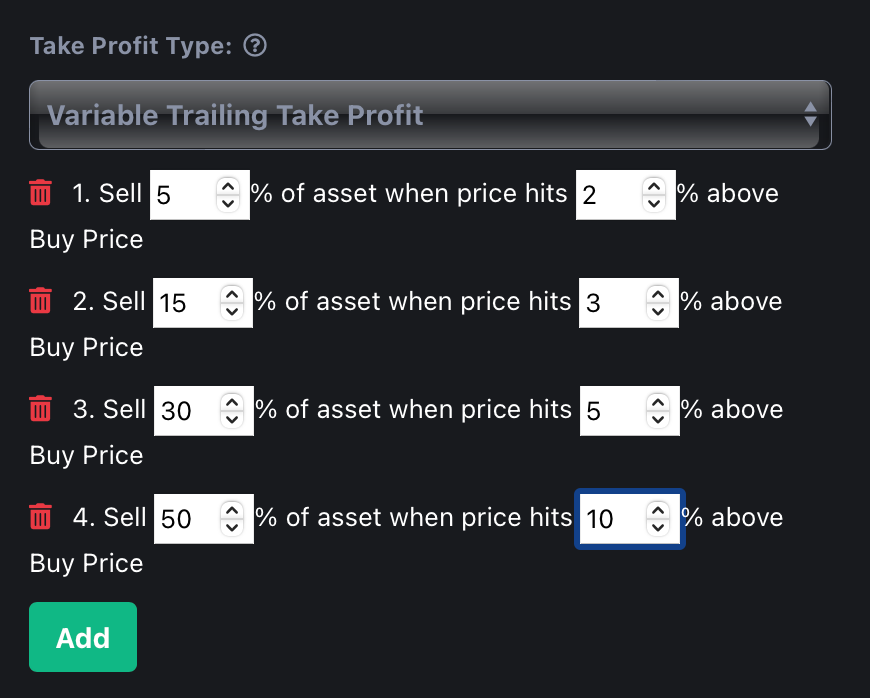
Variable TTP allows a trader to exit a percentage of their stock holdings whenever a price level is hit. The intervals between the price levels are not the same. It is important for the trader to ensure that the total percentages for all the asset allocations are equal to 100%.
(Total Sell Percentages = 100%. Variable TTP is correctly configured)
If the exit percentage is not equal to 100%, the bot will never exit since there are remaining stocks that are not sold.
### Trailing Take Profit And Extra Order Combination
TTP allows a trader to run a dynamic, yo-yo strategy. If a bot has activated TTP and encounters an entry condition again, an extra order (if set by the user) will be executed by the bot.
This interplay of buy-sell-buy-sell allows a user to run a longer strategy profitably, as long as the price appreciates in the long run.
When a new extra order is executed, the average buy price will be refreshed based on previous buy/sell orders.
A deal is considered complete only when the bot has sold all the stocks bought in previous orders.
---
# Agent Instructions
This documentation is published with GitBook. GitBook is the documentation platform designed so that both humans and AI agents can read, navigate, and reason over technical content effectively. Learn more at gitbook.com.
## Querying This Documentation
If you need additional information that is not directly available in this page, you can query the documentation by asking a question.
Perform an HTTP GET request on the following URL with the `ask` and `goal` query parameters:
```
GET https://docs.stockhero.ai/bot-settings/trailing-take-profit.md?ask=&goal=
```
`ask` is the immediate question: it should be specific, self-contained, and written in natural language.
`goal` is what the user is ultimately trying to achieve, the reason they need the answer. Sharing it helps GitBook give you a better, more relevant answer. A goal is most helpful when it describes the outcome the user wants rather than restating the question. For example, with `ask=how do I create an API token`, a goal like `automate deployments from our CI pipeline` lets GitBook tailor the answer to that use case.
The response will contain a direct answer to the question and relevant excerpts and sources from the documentation.
Use this mechanism when the answer is not explicitly present in the current page, you need clarification or additional context, or you want to retrieve related documentation sections.